Most AI demos fail in the real world for two reasons: **Amnesia** and **Timeouts**.
A standard Lambda function dies after 15 minutes. A standard chat bot forgets context when the session ends. But enterprise workflows—like investigating financial fraud or onboarding a new employee—take days, not minutes.
**AWS Bedrock AgentCore** addresses both: it provides a managed runtime that supports long-running sessions (up to 8 hours) and persistent memory. This guide breaks down the architecture and shows how to build on it.
## The Architecture: Supervisor and Workers
We don't build one giant agent. We build a system.

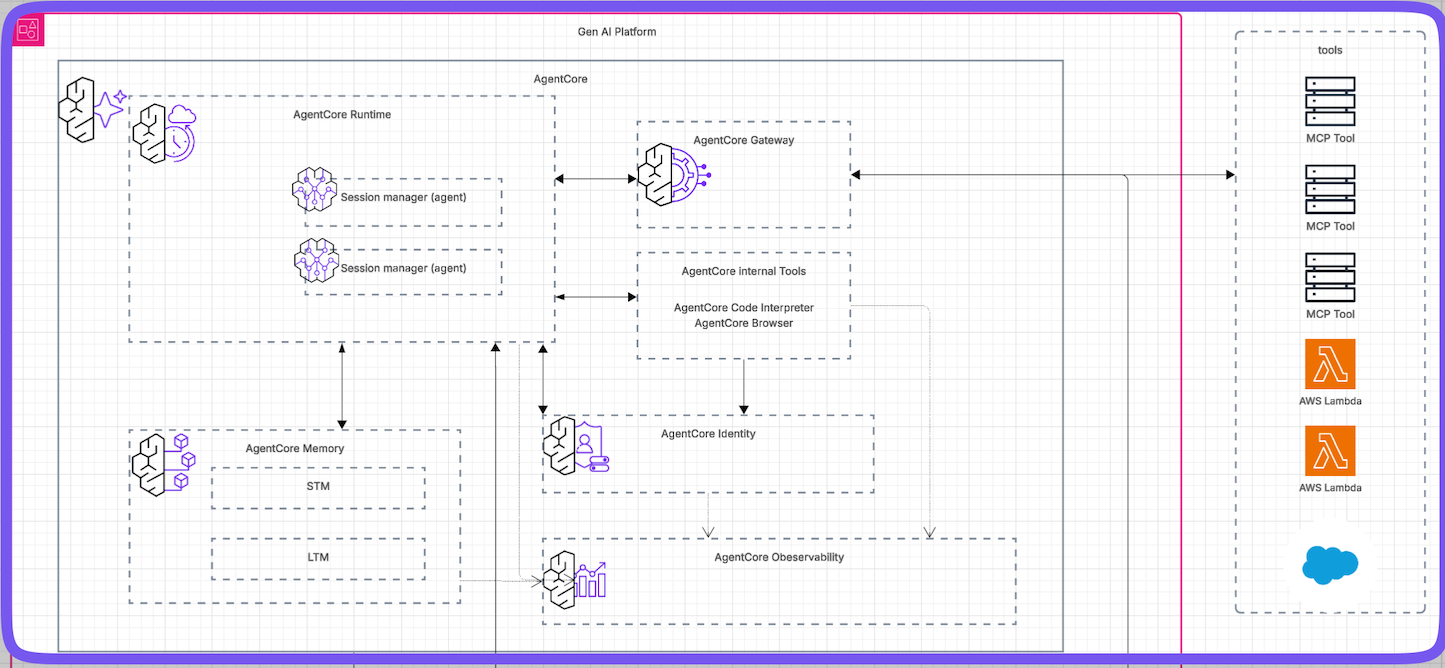
Imagine that each `session manager(agent)` in the diagram has a role below:
* **Supervisor:** The "Boss." It takes the user request ("Investigate TechCorp") and delegates work.
* **Retrieval Agent:** The "Researcher." It checks internal databases.
* **Compliance Agent:** The "Lawyer." It waits for bank data (which might take 3 days) and then files a report.
## The Session Lifecycle
Unlike a standard container that spins down immediately, an AgentCore session has a state machine designed for the long running process (up to 8 hours).
```mermaid
stateDiagram-v2
    [*] --> SessionActive: Start Request

    state SessionActive {
        [*] --> SyncRequests
        SyncRequests --> AsyncPings: Background Work
    }

    SessionActive --> SessionIdle: Response Ends / No Pings

    state SessionIdle {
        [*] --> Waiting
    }

    SessionIdle --> SessionTerminated: 15 Mins Inactivity
    SessionActive --> MaxSessionDuration: 8 Hours Limit Reached
    MaxSessionDuration --> SessionTerminated
```
1. **Active:** The agent is processing or waiting for a tool.
2. **Idle:** The agent goes to sleep to save money but keeps its state.
3. **Terminated:** after 15 minutes of silence (configurable) or 8 hours total.
## Configuration Guide
To deploy this, you package your agent code (Python/LangChain) into a Docker container and push it to ECR. Then, you configure the AgentCore Runtime.
### 1. Dockerfile Setup
Wrap your agent with the `bedrock-agentcore-runtime` base image.
```dockerfile
FROM public.ecr.aws/bedrock-agentcore/runtime:latest
# Install dependencies
COPY requirements.txt .
RUN pip install -r requirements.txt
# Copy your agent code
COPY src/ .
# The entrypoint is handled by the base image,
# just ensure your agent exposes the standard interface.
```
### 2. Runtime Configuration (Python SDK)
Use the `bedrock_agentcore_starter_toolkit` to configure the runtime in your `app.py`.
```python
from bedrock_agentcore_starter_toolkit import Runtime
def create_app():
# Define the runtime config
config = {
"max_session_duration_seconds": 28800, # 8 Hours
"idle_timeout_seconds": 900 # 15 Minutes
}
# Initialize runtime
runtime = Runtime(config=config)
return runtime.start()
if __name__ == "__main__":
create_app()
```
## Persistent Memory
What lets an agent wake up after 3 days and still recall "Day 0" is **AgentCore Memory**.
It automatically separates storage:
* **Short Term:** Raw chat logs and events (access restricted to the specific `actorId`).
* **Long Term:** Summarized insights (stored in namespaced "folders").
```mermaid
flowchart LR
Events["Incoming Events"] -->|Sync Write| STM["Short Term Memory"]
STM -->|Async Read| Extractor[["Automatic Extraction"]] -->|Async Write| LTM["Long Term Memory"]
```
## Security Best Practice
Use **Conditional Keys** in your IAM policies to ensure Tenant A never reads Tenant B's memory.
```json
{
"Version": "2012-10-17",
"Statement": [
{
"Effect": "Allow",
"Action": ["bedrock:Retrieve"],
"Resource": "*",
"Condition": {
"StringEquals": {
"bedrock-agentcore:actorId": "${aws:PrincipalTag/TenantID}"
}
}
}
]
}
```
## Conclusion
AgentCore allows you to move from "Prompt Engineering" to "System Engineering." By handling the infrastructure of long-running sessions and state management, you can focus on the business logic of your agents.
**References:**
* [AWS Bedrock AgentCore Documentation](https://aws.amazon.com/bedrock/agents/)
Most AI demos fail in the real world for two reasons: Amnesia and Timeouts.
A standard Lambda function dies after 15 minutes. A standard chat bot forgets context when the session ends. But enterprise workflows—like investigating financial fraud or onboarding a new employee—take days, not minutes.
AWS Bedrock AgentCore addresses both: it provides a managed runtime that supports long-running sessions (up to 8 hours) and persistent memory. This guide breaks down the architecture and shows how to build on it.
The Architecture: Supervisor and Workers
We don’t build one giant agent. We build a system.
Imagine that each session manager(agent) in the diagram has a role below:
Supervisor: The “Boss.” It takes the user request (“Investigate TechCorp”) and delegates work.
Retrieval Agent: The “Researcher.” It checks internal databases.
Compliance Agent: The “Lawyer.” It waits for bank data (which might take 3 days) and then files a report.
The Session Lifecycle
Unlike a standard container that spins down immediately, an AgentCore session has a state machine designed for the long running process (up to 8 hours).
stateDiagram-v2
[*] --> SessionActive: Start Request
state SessionActive {
[*] --> SyncRequests
SyncRequests --> AsyncPings: Background Work
}
SessionActive --> SessionIdle: Response Ends / No Pings
state SessionIdle {
[*] --> Waiting
}
SessionIdle --> SessionTerminated: 15 Mins Inactivity
SessionActive --> MaxSessionDuration: 8 Hours Limit Reached
MaxSessionDuration --> SessionTerminated
Active: The agent is processing or waiting for a tool.
Idle: The agent goes to sleep to save money but keeps its state.
Terminated: after 15 minutes of silence (configurable) or 8 hours total.
Configuration Guide
To deploy this, you package your agent code (Python/LangChain) into a Docker container and push it to ECR. Then, you configure the AgentCore Runtime.
1. Dockerfile Setup
Wrap your agent with the bedrock-agentcore-runtime base image.
 1
 2
 3
 4
 5
 6
 7
 8
 9
10
11
FROMpublic.ecr.aws/bedrock-agentcore/runtime:latest# Install dependenciesCOPY requirements.txt .RUN pip install -r requirements.txt# Copy your agent codeCOPY src/ .# The entrypoint is handled by the base image, # just ensure your agent exposes the standard interface.
2. Runtime Configuration (Python SDK)
Use the bedrock_agentcore_starter_toolkit to configure the runtime in your app.py.
AgentCore allows you to move from “Prompt Engineering” to “System Engineering.” By handling the infrastructure of long-running sessions and state management, you can focus on the business logic of your agents.