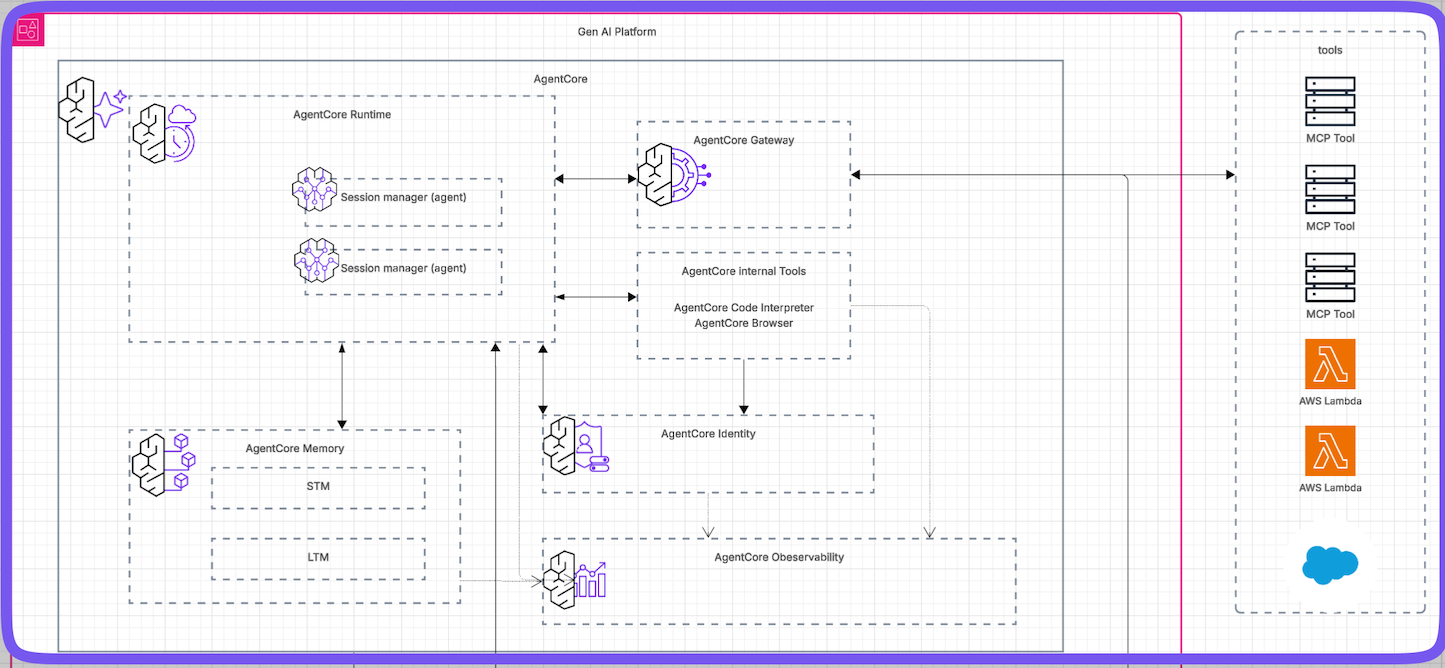
AWS Bedrock AgentCore is the "Infrastructure-as-Code" layer for AI agents. It wraps your raw python code with enterprise-grade security and scaling, effectively moving AI Agents from "Laptop Experiments" to "Enterprise Production".
This guide summarizes the key components: Runtime, Identity, Gateway, Memory, and Observability.
## 1. Introduction: The Shift to Agentic AI
We are moving from simple **Generative AI** (which just creates text or images) to **Agentic AI**. Unlike a chatbot that just talks, an Agent can plan, use tools, and complete complex jobs without human help.
However, enterprise agents face difficult challenges:
* **Scaling:** Handling thousands of users at once.
* **Security:** Keeping data safe and private.
* **Duration:** Running tasks that take hours (standard cloud functions often time out after 15 minutes).
**AWS Bedrock AgentCore** solves this by providing a set of tools that "wraps" your agent code to automatically handle servers, security, and memory.

---
## 2. Agent Runtime (Serverless Hosting)
The **Runtime** is the environment where your agent lives. It solves the "infrastructure" problem. You don't need to manage servers; AWS scales it for you. You can turn a local python script into a production service with just a few lines of configuration.
### How to Implement It
**Step 1: Import the Toolkit**
```python
from bedrock_agentcore_starter_toolkit import Runtime
```
**Step 2: Configure the Runtime**
This single block of code sets up the entire infrastructure.
```python
response = agentcore_runtime.configure(
entrypoint="app.py", # Where your agent code starts
auto_create_execution_role=True, # Automatically sets up permission security
auto_create_ecr=True, # Automatically creates storage for your code
authorizer_configuration={ # Sets up the security login system
"customJWTAuthorizer": {
"discoveryUrl": discovery_url,
"allowedClients": [client_id]
}
}
)
```
---
## 3. Identity & Security
Security is handled in two ways: **Inbound** (who is talking to the agent?) and **Outbound** (how does the agent talk to other APIs?).
### A. Inbound Security (User Login)
The system prevents strangers from using your agent via **JWT Tokens** (digital ID cards). If you try to run the agent without a token, it blocks you with `AccessDeniedException`. You must log in to get a "Bearer Token" first.
```python
bearer_token = reauthenticate_user(client_id, pool_id)
# Now the call succeeds because we have the ID card
invoke_response = agentcore_runtime.invoke(
{"prompt": "what is 4 + 4?"},
bearer_token=bearer_token
)
```
### B. Outbound Security (API Keys)
You should never save passwords (like OpenAI API keys) directly in your code. Agent Core uses a **Credential Provider** to fetch them safely.
**Step 1: Create the Provider**
```python
api_key_provider = identity_client.create_api_key_credential_provider({
"name": "openai-apikey-provider",
"apiKey": api_key
})
```
**Step 2: Use the Decorator**
This tells AWS: "Only get the password when this specific function runs."
```python
@requires_api_key(
provider_name="openai-apikey-provider"
)
async def need_api_key(*, api_key: str):
# The key is injected safely here
global OPENAI_API_KEY_FROM_CREDS_PROVIDER
OPENAI_API_KEY_FROM_CREDS_PROVIDER = api_key
```
---
## 4. AgentCore Gateway: Managing Tools
If you have 300 tools (e.g., "Check Inventory," "Reset Password"), sending them all to an AI model is expensive and confusing. The **Gateway** acts as a smart librarian using **Semantic Search** to find the top relevant tools for the user's specific question.
### How to Implement It
**Step 1: Create a Flexible Tool (Lambda)**
You can write one AWS Lambda function that handles multiple jobs.
```python
def lambda_handler(event, context):
# The Gateway tells us which tool the agent wanted
toolName = context.client_context.custom['bedrockAgentCoreToolName']
if toolName == 'get_order_tool':
# run get order logic...
```
**Step 2: Register the Tool with MCP**
MCP (Model Context Protocol) is a standard way to describe tools.
```python
lambda_target_config = {
"mcp": {
"lambda": {
"lambdaArn": lambda_arn,
"toolsSchema": {
"name": "get_order_tool",
"description": "Tool to get the order"
}
}
}
}
```
---
## 5. AgentCore Memory: The Brain
Standard agents have "amnesia". Agent Core gives them persistent memory with two strategies:
* **Synchronous:** Saves immediate chat messages instantly.
* **Asynchronous:** A background process scans the chat to extract **Long-Term Memories** (like user preferences) without slowing down the conversation.
### How to Implement It
**Step 1: The "Hook" (Automatic Saving)**
Use a Hook to automatically load history when the agent starts and save new messages regarding user preferences.
```python
class MemoryHookProvider(HookProvider):
def on_agent_initialized(self, event):
# Automatically loads the last 5 messages
recent_turns = self.memory_client.get_last_k_turns()
```
**Step 2: Retrieve and Use**
When the agent starts, it can proactively ask the memory.
```python
food_preferences = self.client.retrieve_memories(
query="food preferences",
top_k=3
)
```
*Result:* The agent might find memories like *"User explicitly mentioned enjoying Italian cuisine"*.
---
## 6. AgentCore Browser: The Eyes
Letting an AI browse the open internet is dangerous. Agent Core provides a **Serverless Browser** that runs in a secure, isolated virtual machine.
**The Workflow:**
1. **Command:** Agent says "Click the button at X:286, Y:102".
2. **Action:** The cloud browser clicks it.
3. **Result:** The browser sends a screenshot back to the agent.
### How to Implement It
It is extremely simple to add. You just import the browser tool and give it to the agent.
```python
from strands_tools.browser import AgentCoreBrowser
# Create the browser tool
agent_core_browser = AgentCoreBrowser(region=self.region)
# Add it to the agent's toolbox
self.agent = Agent(
tools=[agent_core_browser.browser],
model="anthropic.claude-3-haiku",
system_prompt="You are an intelligent web analyst..."
)
```
---
## 7. AgentCore Code Interpreter: The Calculator
LLMs are often bad at math or complex data analysis. The **Code Interpreter** allows the agent to write code (Python/JS) and run it in a secure sandbox to get the right answer and minimize hallucinations.
**The Principles:**
1. When making claims about code or calculations - write code to verify them.
2. Use `execute_python` to test mathematical logic.
**The Execution:**
The agent can generate Python code dynamically (e.g., to find prime numbers), run it in the sandbox, and use the **proven data** to answer the user.
```python
# The agent wrote this code dynamically:
def is_prime(n):
if n < 2: return False
# ... logic ...
```
---
## 8. AgentCore Observability: Visibility & Debugging
When an agent fails, it is difficult to know if the error happened in the Prompt, the Tool, the Memory, or the LLM. Agent Core provides a comprehensive observability stack built on **OpenTelemetry (OTEL)** and **AWS CloudWatch**.
### A. Architecture
The framework captures data (traces and logs) from:
1. **Agent Deployed on Runtime**
2. **Agent Memory**
3. **Tools from Gateway**
### B. Implementation Steps
**Step 1: Add Dependencies**
Include `aws-opentelemetry-distro` in your `requirements.txt`.
```txt
strands-agents
bedrock-agentcore
aws-opentelemetry-distro # Required for tracing
opentelemetry-instrumentation
```
**Step 2: Instrument the Container**
Wrap the launch command in your `Dockerfile`.
```Dockerfile
ENV DOCKER_CONTAINER=1
# Use the full module path with auto-instrumentation
CMD ["opentelemetry-instrument", "python", "-m", "observability_demo_agent"]
```
**Step 3: Console Configuration**
In AWS CloudWatch settings, enable:
1. **X-Ray Traces:** visual map of requests.
2. **Transaction Search:** search logs for specific user actions.
### C. Validation
Once deployed, you get access to visual dashboards showing high-level metrics like **Sessions & Traces** and **Token Usage** (cost tracking).
---
## Summary
**AWS Bedrock Agent Core** is not just one tool, but a complete ecosystem for enterprise AI:
1. **Runtime:** Makes deployment easy.
2. **Identity:** Handles security/login.
3. **Gateway:** Manages hundreds of tools intelligently.
4. **Memory:** Gives the agent a long-term brain.
5. **Browser & Interpreter:** Gives the agent safe eyes and logic capabilities.
AWS Bedrock AgentCore is the “Infrastructure-as-Code” layer for AI agents. It wraps your raw python code with enterprise-grade security and scaling, effectively moving AI Agents from “Laptop Experiments” to “Enterprise Production”.
This guide summarizes the key components: Runtime, Identity, Gateway, Memory, and Observability.
1. Introduction: The Shift to Agentic AI
We are moving from simple Generative AI (which just creates text or images) to Agentic AI. Unlike a chatbot that just talks, an Agent can plan, use tools, and complete complex jobs without human help.
However, enterprise agents face difficult challenges:
Scaling: Handling thousands of users at once.
Security: Keeping data safe and private.
Duration: Running tasks that take hours (standard cloud functions often time out after 15 minutes).
AWS Bedrock AgentCore solves this by providing a set of tools that “wraps” your agent code to automatically handle servers, security, and memory.
2. Agent Runtime (Serverless Hosting)
The Runtime is the environment where your agent lives. It solves the “infrastructure” problem. You don’t need to manage servers; AWS scales it for you. You can turn a local python script into a production service with just a few lines of configuration.
This single block of code sets up the entire infrastructure.
 1
 2
 3
 4
 5
 6
 7
 8
 9
10
11
response=agentcore_runtime.configure(entrypoint="app.py",# Where your agent code startsauto_create_execution_role=True,# Automatically sets up permission securityauto_create_ecr=True,# Automatically creates storage for your codeauthorizer_configuration={# Sets up the security login system"customJWTAuthorizer":{"discoveryUrl":discovery_url,"allowedClients":[client_id]}})
3. Identity & Security
Security is handled in two ways: Inbound (who is talking to the agent?) and Outbound (how does the agent talk to other APIs?).
A. Inbound Security (User Login)
The system prevents strangers from using your agent via JWT Tokens (digital ID cards). If you try to run the agent without a token, it blocks you with AccessDeniedException. You must log in to get a “Bearer Token” first.
1
2
3
4
5
6
bearer_token=reauthenticate_user(client_id,pool_id)# Now the call succeeds because we have the ID cardinvoke_response=agentcore_runtime.invoke({"prompt":"what is 4 + 4?"},bearer_token=bearer_token)
B. Outbound Security (API Keys)
You should never save passwords (like OpenAI API keys) directly in your code. Agent Core uses a Credential Provider to fetch them safely.
Step 2: Use the Decorator
This tells AWS: “Only get the password when this specific function runs.”
1
2
3
4
5
6
7
@requires_api_key(provider_name="openai-apikey-provider")asyncdefneed_api_key(*,api_key:str):# The key is injected safely hereglobalOPENAI_API_KEY_FROM_CREDS_PROVIDEROPENAI_API_KEY_FROM_CREDS_PROVIDER=api_key
4. AgentCore Gateway: Managing Tools
If you have 300 tools (e.g., “Check Inventory,” “Reset Password”), sending them all to an AI model is expensive and confusing. The Gateway acts as a smart librarian using Semantic Search to find the top relevant tools for the user’s specific question.
How to Implement It
Step 1: Create a Flexible Tool (Lambda)
You can write one AWS Lambda function that handles multiple jobs.
1
2
3
4
5
6
deflambda_handler(event,context):# The Gateway tells us which tool the agent wantedtoolName=context.client_context.custom['bedrockAgentCoreToolName']iftoolName=='get_order_tool':# run get order logic...
Step 2: Register the Tool with MCP
MCP (Model Context Protocol) is a standard way to describe tools.
1
2
3
4
5
6
7
8
9
10
11
lambda_target_config={"mcp":{"lambda":{"lambdaArn":lambda_arn,"toolsSchema":{"name":"get_order_tool","description":"Tool to get the order"}}}}
5. AgentCore Memory: The Brain
Standard agents have “amnesia”. Agent Core gives them persistent memory with two strategies:
Asynchronous: A background process scans the chat to extract Long-Term Memories (like user preferences) without slowing down the conversation.
How to Implement It
Step 1: The “Hook” (Automatic Saving)
Use a Hook to automatically load history when the agent starts and save new messages regarding user preferences.
1
2
3
4
classMemoryHookProvider(HookProvider):defon_agent_initialized(self,event):# Automatically loads the last 5 messagesrecent_turns=self.memory_client.get_last_k_turns()
Step 2: Retrieve and Use
When the agent starts, it can proactively ask the memory.
Result: The agent might find memories like “User explicitly mentioned enjoying Italian cuisine”.
6. AgentCore Browser: The Eyes
Letting an AI browse the open internet is dangerous. Agent Core provides a Serverless Browser that runs in a secure, isolated virtual machine.
The Workflow:
Command: Agent says “Click the button at X:286, Y:102”.
Action: The cloud browser clicks it.
Result: The browser sends a screenshot back to the agent.
How to Implement It
It is extremely simple to add. You just import the browser tool and give it to the agent.
1
2
3
4
5
6
7
8
9
10
11
fromstrands_tools.browserimportAgentCoreBrowser# Create the browser toolagent_core_browser=AgentCoreBrowser(region=self.region)# Add it to the agent's toolboxself.agent=Agent(tools=[agent_core_browser.browser],model="anthropic.claude-3-haiku",system_prompt="You are an intelligent web analyst...")
7. AgentCore Code Interpreter: The Calculator
LLMs are often bad at math or complex data analysis. The Code Interpreter allows the agent to write code (Python/JS) and run it in a secure sandbox to get the right answer and minimize hallucinations.
The Principles:
When making claims about code or calculations - write code to verify them.
Use execute_python to test mathematical logic.
The Execution:
The agent can generate Python code dynamically (e.g., to find prime numbers), run it in the sandbox, and use the proven data to answer the user.
1
2
3
4
# The agent wrote this code dynamically:defis_prime(n):ifn<2:returnFalse# ... logic ...
When an agent fails, it is difficult to know if the error happened in the Prompt, the Tool, the Memory, or the LLM. Agent Core provides a comprehensive observability stack built on OpenTelemetry (OTEL) and AWS CloudWatch.
A. Architecture
The framework captures data (traces and logs) from:
Agent Deployed on Runtime
Agent Memory
Tools from Gateway
B. Implementation Steps
Step 1: Add Dependencies
Include aws-opentelemetry-distro in your requirements.txt.
1
2
3
4
strands-agents
bedrock-agentcore
aws-opentelemetry-distro  # Required for tracing
opentelemetry-instrumentation
Step 2: Instrument the Container
Wrap the launch command in your Dockerfile.
1
2
3
ENVDOCKER_CONTAINER=1# Use the full module path with auto-instrumentationCMD["opentelemetry-instrument","python","-m","observability_demo_agent"]
Step 3: Console Configuration
In AWS CloudWatch settings, enable:
X-Ray Traces: visual map of requests.
Transaction Search: search logs for specific user actions.
C. Validation
Once deployed, you get access to visual dashboards showing high-level metrics like Sessions & Traces and Token Usage (cost tracking).
Summary
AWS Bedrock Agent Core is not just one tool, but a complete ecosystem for enterprise AI:
Runtime: Makes deployment easy.
Identity: Handles security/login.
Gateway: Manages hundreds of tools intelligently.
Memory: Gives the agent a long-term brain.
Browser & Interpreter: Gives the agent safe eyes and logic capabilities.