In the rapidly evolving world of Generative AI, deploying agents one by one quickly becomes a bottleneck. We need systems that can build systems—an **Agent Factory**.
Today, we will dissect the Agent Factory system I learned at `AWS re:Invent 2025`. AWS engineers built a system that can build agents using AWS AgentCore, and the repo is [https://github.com/mcginnbros/agent-factory](https://github.com/mcginnbros/agent-factory).
This platform is designed to bootstrap your personal AWS environment into a fully functional agent ecosystem using AWS AgentCore.
In this post, we'll peel back the layers and look at the infrastructure that makes this possible: from IAM policies and ECR repositories to the Python tooling that orchestrates it all.
---
## 1. The Core Architecture
At the heart of this system lies the concept of a **Builder Agent**. Instead of writing Terraform or CloudFormation for every new agent you want to experiment with, you talk to the Builder Agent.
The Builder Agent comprises:
1. **Strands Framework**: The application logic driving the agent's reasoning.
2. **AWS AgentCore Runtime**: The serverless compute environment hosting the agent container.
3. **Tooling Access**: Permissions to call AWS APIs to create *other* resources.
When you ask the Builder Agent to "Create a weather bot," it doesn't just write code; it provisions real infrastructure.
## 2. Infrastructure Under the Hood
To enable a safe yet powerful Agent Factory, we lean heavily on AWS native services.
```mermaid
graph TB
    subgraph Client ["Client Layer"]
        User[User / Developer]
        CLI[Python CLI - demo_cli.py]
    end

    subgraph AWS ["AWS Cloud Account"]
        subgraph IAM ["IAM & Security"]
            Roles[IAM Roles]
        end

        subgraph Control ["Control Plane"]
            AgentCoreAPI[Bedrock AgentCore API]
            Gateway[AgentCore Gateway]
        end

        subgraph Data ["Data Plane"]
            BuilderRuntime[Builder Agent Runtime]
            AgentRuntime[Deployed Agent Runtime]
            Memory[AgentCore Memory]
        end

        subgraph Storage ["Artifacts"]
            ECR[ECR: reinvent/agents]
        end
    end

    User --> CLI
    CLI --> AgentCoreAPI
    AgentCoreAPI --> BuilderRuntime
    BuilderRuntime --> AgentCoreAPI
    AgentCoreAPI --> AgentRuntime
    BuilderRuntime --> Memory
    AgentRuntime --> Memory
    BuilderRuntime -.->|Pulls Image from ECR| ECR
    AgentRuntime -.->|Pulls Image from ECR| ECR
    style AWS fill:#f9f9f9,stroke:#333,stroke-width:2px
```
### Identity and Access Management (IAM)
Security is paramount when an AI agent has permission to deploy infrastructure. We utilize specific IAM roles with carefully scoped trust policies.
* **`AgentCoreExecutionRole`**: This is the primary identity for our agents.
* **Trust Policy**: Allows `bedrock-agentcore.amazonaws.com` to assume this role.
* **Permissions**:
* `AgentCoreBradrockAccess`: Invoke models (Claude Sonnet/Haiku).
* `AgentCoreECRAccess`: Pull Docker images from our private ECR.
* `AgentCoreLambdaInvoke`: Call Lambda functions (used for tools).
* `AgentCoreA2AAccess`: Communicate with other agents via the A2A protocol.
### Elastic Container Registry (ECR)
We use a centralized repository named **`reinvent/agents`** to store our agent images.
* **Base Image**: Contains heavy dependencies (Python, Strands, Playwright).
* **Generic Agent Image**: A standardized template that can load specific configurations at runtime.
* **Builder Image**: The specialized image for our factory orchestrator.
### AgentCore Memory
We provision a shared **AgentCore Memory** instance (`reinvent_agent_factory-shared`) that allows agents to retain context across sessions.
---
## 3. Deep Dive: Inside the Builder Agent
The `builder_agent` directory is the gold mine of this project. It orchestrates the creation of other agents using a "Generic Agent" strategy.
### The Generic Agent Pattern
Instead of building a unique Docker image for every new bot (which takes minutes), we use a single **Generic Agent Container**.
* **`templates/generic_agent.py`**: This script is the entry point for *all* deployed agents.
* **Dynamic Configuration**: Behavior is injected at runtime via Environment Variables (`SYSTEM_PROMPT`, `AGENT_MODE`, `ENABLE_BROWSER`).
This allows the Builder Agent to deploy a new agent in seconds by simply pointing a new Runtime to the existing ECR image.
### Agent Modes: Server vs. Client
The platform supports two distinct modes of operation:
#### **Server Mode (`AGENT_MODE='server'`)**
* **Purpose**: To provide tools or services to other agents.
* **Mechanism**: Starts a **FastAPI server on port 9000**.
* **Protocol**: Exposed via the **Agent-to-Agent (A2A)** protocol.
* **Usage**: The AgentCore Gateway routes requests to this port.
#### **Client Mode (`AGENT_MODE='client'`)**
* **Purpose**: To consume services and orchestrate tasks.
* **Mechanism**: Runs a loop processing user input; does *not* listen on a port.
* **Capabilities**: Initialized with `KNOWN_AGENT_IDS` to call Server agents.
### Docker Layering Strategy
We use a `FROM ...:base` pattern in our Dockerfiles. We verify that a base image (containing heavy libraries like `strands`, `boto3`, `playwright`) exists first. The Builder's Dockerfile then just copies the lightweight Python scripts on top. This ensures builds are lightning fast.
---
## 4. Interacting with the AgentCore SDK
The `demo_cli.py` provides a practical example of how to interact with the AgentCore service using `boto3`.
### Two Distinct Clients
```python
# 1. Runtime Client: For invoking agents
self.client = boto3.client("bedrock-agentcore", region_name=REGION)
# 2. Control Plane Client: For managing resources (deploy, list, delete)
self.control_client = boto3.client("bedrock-agentcore-control", region_name=REGION)
```
### Listing and Inspecting Agents
We use the control client to inspect configuration details, such as checking for the A2A protocol and to see what agents are running.
```python
# List all runtimes
response = self.control_client.list_agent_runtimes()
for runtime in response.get("agentRuntimes", []):
agent_id = runtime["agentRuntimeId"]
# Get full details to check protocol configuration
details = self.control_client.get_agent_runtime(agentRuntimeId=agent_id)
# Check if A2A is enabled
protocol_config = details.get("protocolConfiguration", {})
has_a2a_protocol = (protocol_config.get("serverProtocol") == "A2A")
```
#### Invoking Agents: Simple vs. JSON-RPC
When sending messages to an agent using the runtime `client`, the payload format differs based on the agent's mode:
1. **Standard Agents**: Use a simple JSON payload.
2. **A2A Agents**: Use the JSON-RPC 2.0 standard.
```python
# Prepare payload based on protocol
if use_jsonrpc:
# A2A Agents expect JSON-RPC 2.0
payload = {
"jsonrpc": "2.0",
"method": "message/send",
"params": {
"message": {
"kind": "message",
"role": "user",
"parts": [{"kind": "text", "text": message}],
"messageId": f"msg-{uuid.uuid4().hex[:8]}"
}
},
"id": request_id
}
else:
# Standard Agents accept simple JSON
payload = {"prompt": message}
# Invoke the agent
response = self.client.invoke_agent_runtime(
agentRuntimeArn=agent_arn,
runtimeSessionId=session_id, # Maintains conversation state
payload=json.dumps(payload),
qualifier="DEFAULT"
)
```
This dual-mode support allows the platform to handle both simple standalone bots and complex, interconnected agent swarms.
---
## 5. Developer Experience: Python, uv, and Automation
Managing dependencies in modern Python projects can be complex. One thing I added from the original repo is utilizing [**uv**](https://github.com/astral-sh/uv), an extremely fast Python package installer and resolver.
We leverages `uv` to ensure reproducible builds. We've also automated the entire bootstrapping process with `scripts/setup_aws_resources.py`, which handles:
1. Detecting AWS Account/Region.
2. Creating IAM Roles and ECR Repositories.
3. Building and pushing Docker images.
4. Generating the local `.env` configuration.
---
## 6. Getting Started
If you have the repository cloned, setting up your own Agent Factory is straightforward using `uv`:
### 1. Configure Credentials
```bash
cd agent-factory
pip install uv
uv --version # check uv is installed
uv init # initializing uv project and adding dependencies
aws configure
```
### 2. Initialize Environment
```bash
uv sync
```
### 3. Provision Infrastructure
```bash
uv run scripts/setup_aws_resources.py
```
This script acts as your bootstrap "Infrastructure as Code".
It uses `boto3` to:
1. Detect your AWS Account ID and Region.
2. Check for and create missing IAM Roles.
3. Create the `reinvent/agents` ECR repository.
4. Authenticate Docker with ECR.
5. Build and push the necessary Docker images.
6. Generate a local `.env` file for your client configuration. (do not forget to add it to `.gitignore` :))
### 4. Deploy Builder & Run CLI
```bash
uv run scripts/deploy_builder.py
uv run demo_cli.py
```

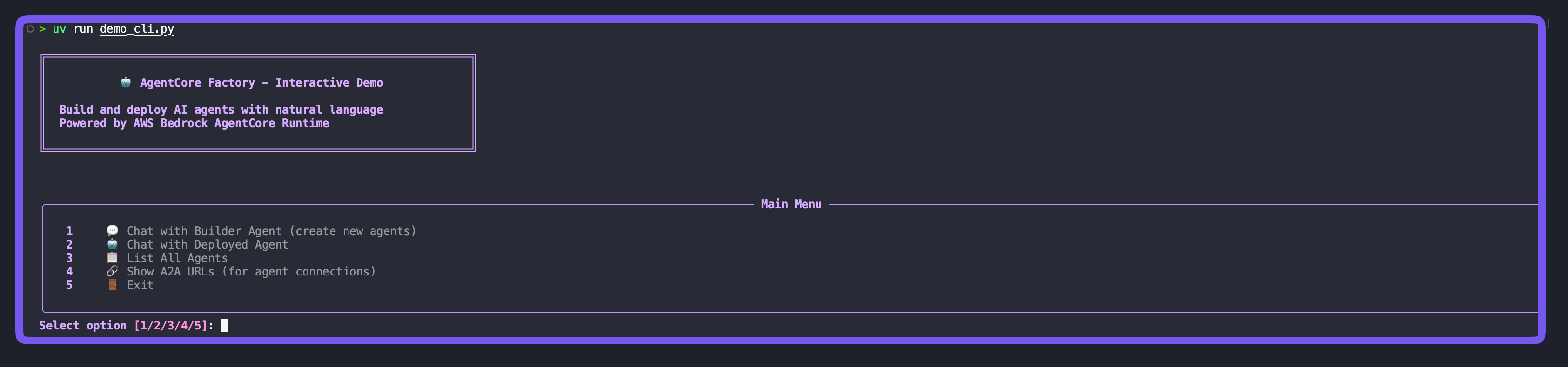
You can now chat with the Builder Agent and ask it to create new bots for you!
In the rapidly evolving world of Generative AI, deploying agents one by one quickly becomes a bottleneck. We need systems that can build systems—an Agent Factory.
Today, we will dissect the Agent Factory system I learned at AWS re:Invent 2025. AWS engineers built a system that can build agents using AWS AgentCore, and the repo is https://github.com/mcginnbros/agent-factory.
This platform is designed to bootstrap your personal AWS environment into a fully functional agent ecosystem using AWS AgentCore.
In this post, we’ll peel back the layers and look at the infrastructure that makes this possible: from IAM policies and ECR repositories to the Python tooling that orchestrates it all.
1. The Core Architecture
At the heart of this system lies the concept of a Builder Agent. Instead of writing Terraform or CloudFormation for every new agent you want to experiment with, you talk to the Builder Agent.
The Builder Agent comprises:
Strands Framework: The application logic driving the agent’s reasoning.
AWS AgentCore Runtime: The serverless compute environment hosting the agent container.
Tooling Access: Permissions to call AWS APIs to create other resources.
When you ask the Builder Agent to “Create a weather bot,” it doesn’t just write code; it provisions real infrastructure.
2. Infrastructure Under the Hood
To enable a safe yet powerful Agent Factory, we lean heavily on AWS native services.
graph TB
subgraph Client ["Client Layer"]
User[User / Developer]
CLI[Python CLI - demo_cli.py]
end
subgraph AWS ["AWS Cloud Account"]
subgraph IAM ["IAM & Security"]
Roles[IAM Roles]
end
subgraph Control ["Control Plane"]
AgentCoreAPI[Bedrock AgentCore API]
Gateway[AgentCore Gateway]
end
subgraph Data ["Data Plane"]
BuilderRuntime[Builder Agent Runtime]
AgentRuntime[Deployed Agent Runtime]
Memory[AgentCore Memory]
end
subgraph Storage ["Artifacts"]
ECR[ECR: reinvent/agents]
end
end
User --> CLI
CLI --> AgentCoreAPI
AgentCoreAPI --> BuilderRuntime
BuilderRuntime --> AgentCoreAPI
AgentCoreAPI --> AgentRuntime
BuilderRuntime --> Memory
AgentRuntime --> Memory
BuilderRuntime -.->|Pulls Image from ECR| ECR
AgentRuntime -.->|Pulls Image from ECR| ECR
style AWS fill:#f9f9f9,stroke:#333,stroke-width:2px
Identity and Access Management (IAM)
Security is paramount when an AI agent has permission to deploy infrastructure. We utilize specific IAM roles with carefully scoped trust policies.
AgentCoreExecutionRole: This is the primary identity for our agents.
Trust Policy: Allows bedrock-agentcore.amazonaws.com to assume this role.
AgentCoreECRAccess: Pull Docker images from our private ECR.
AgentCoreLambdaInvoke: Call Lambda functions (used for tools).
AgentCoreA2AAccess: Communicate with other agents via the A2A protocol.
Elastic Container Registry (ECR)
We use a centralized repository named reinvent/agents to store our agent images.
Base Image: Contains heavy dependencies (Python, Strands, Playwright).
Generic Agent Image: A standardized template that can load specific configurations at runtime.
Builder Image: The specialized image for our factory orchestrator.
AgentCore Memory
We provision a shared AgentCore Memory instance (reinvent_agent_factory-shared) that allows agents to retain context across sessions.
3. Deep Dive: Inside the Builder Agent
The builder_agent directory is the gold mine of this project. It orchestrates the creation of other agents using a “Generic Agent” strategy.
The Generic Agent Pattern
Instead of building a unique Docker image for every new bot (which takes minutes), we use a single Generic Agent Container.
templates/generic_agent.py: This script is the entry point for all deployed agents.
Dynamic Configuration: Behavior is injected at runtime via Environment Variables (SYSTEM_PROMPT, AGENT_MODE, ENABLE_BROWSER).
This allows the Builder Agent to deploy a new agent in seconds by simply pointing a new Runtime to the existing ECR image.
Agent Modes: Server vs. Client
The platform supports two distinct modes of operation:
Server Mode (AGENT_MODE='server')
Purpose: To provide tools or services to other agents.
Mechanism: Starts a FastAPI server on port 9000.
Protocol: Exposed via the Agent-to-Agent (A2A) protocol.
Usage: The AgentCore Gateway routes requests to this port.
Client Mode (AGENT_MODE='client')
Purpose: To consume services and orchestrate tasks.
Mechanism: Runs a loop processing user input; does not listen on a port.
Capabilities: Initialized with KNOWN_AGENT_IDS to call Server agents.
Docker Layering Strategy
We use a FROM ...:base pattern in our Dockerfiles. We verify that a base image (containing heavy libraries like strands, boto3, playwright) exists first. The Builder’s Dockerfile then just copies the lightweight Python scripts on top. This ensures builds are lightning fast.
4. Interacting with the AgentCore SDK
The demo_cli.py provides a practical example of how to interact with the AgentCore service using boto3.
Two Distinct Clients
1
2
3
4
5
# 1. Runtime Client: For invoking agentsself.client=boto3.client("bedrock-agentcore",region_name=REGION)# 2. Control Plane Client: For managing resources (deploy, list, delete)self.control_client=boto3.client("bedrock-agentcore-control",region_name=REGION)
Listing and Inspecting Agents
We use the control client to inspect configuration details, such as checking for the A2A protocol and to see what agents are running.
 1
 2
 3
 4
 5
 6
 7
 8
 9
10
11
12
# List all runtimesresponse=self.control_client.list_agent_runtimes()forruntimeinresponse.get("agentRuntimes",[]):agent_id=runtime["agentRuntimeId"]# Get full details to check protocol configurationdetails=self.control_client.get_agent_runtime(agentRuntimeId=agent_id)# Check if A2A is enabledprotocol_config=details.get("protocolConfiguration",{})has_a2a_protocol=(protocol_config.get("serverProtocol")=="A2A")
Invoking Agents: Simple vs. JSON-RPC
When sending messages to an agent using the runtime client, the payload format differs based on the agent’s mode:
# Prepare payload based on protocolifuse_jsonrpc:# A2A Agents expect JSON-RPC 2.0payload={"jsonrpc":"2.0","method":"message/send","params":{"message":{"kind":"message","role":"user","parts":[{"kind":"text","text":message}],"messageId":f"msg-{uuid.uuid4().hex[:8]}"}},"id":request_id}else:# Standard Agents accept simple JSONpayload={"prompt":message}# Invoke the agentresponse=self.client.invoke_agent_runtime(agentRuntimeArn=agent_arn,runtimeSessionId=session_id,# Maintains conversation statepayload=json.dumps(payload),qualifier="DEFAULT")
This dual-mode support allows the platform to handle both simple standalone bots and complex, interconnected agent swarms.
5. Developer Experience: Python, uv, and Automation
Managing dependencies in modern Python projects can be complex. One thing I added from the original repo is utilizing uv, an extremely fast Python package installer and resolver.
We leverages uv to ensure reproducible builds. We’ve also automated the entire bootstrapping process with scripts/setup_aws_resources.py, which handles:
Detecting AWS Account/Region.
Creating IAM Roles and ECR Repositories.
Building and pushing Docker images.
Generating the local .env configuration.
6. Getting Started
If you have the repository cloned, setting up your own Agent Factory is straightforward using uv:
1. Configure Credentials
1
2
3
4
5
cd agent-factory
pip install uv
uv --version # check uv is installeduv init # initializing uv project and adding dependenciesaws configure
2. Initialize Environment
1
uv sync
3. Provision Infrastructure
1
uv run scripts/setup_aws_resources.py
This script acts as your bootstrap “Infrastructure as Code”.
It uses boto3 to:
Detect your AWS Account ID and Region.
Check for and create missing IAM Roles.
Create the reinvent/agents ECR repository.
Authenticate Docker with ECR.
Build and push the necessary Docker images.
Generate a local .env file for your client configuration. (do not forget to add it to .gitignore :))
4. Deploy Builder & Run CLI
1
2
uv run scripts/deploy_builder.py
uv run demo_cli.py
You can now chat with the Builder Agent and ask it to create new bots for you!