> A May 2026 field guide to running your own AI agent on AWS. The infrastructure and gotchas are real, but the upstream image and configuration must be re-checked before a new deployment.
[Hermes Agent (NousResearch)](https://github.com/NousResearch/hermes-agent) |
[Hermes Docker deployment](https://hermes-agent.nousresearch.com/docs/user-guide/docker/) |
[AWS CDK Documentation](https://docs.aws.amazon.com/cdk/v2/guide/home.html) |
[Slack Socket Mode](https://api.slack.com/apis/socket-mode)
> **Review note (2026-08-28):** This article records a deployment from May 23, 2026. Hermes now documents a supported Docker path using the `nousresearch/hermes-agent` image and persistent data mounted at `/opt/data`; schema migrations can create backups. The ECS/CDK architecture below is illustrative for this snapshot. Inspect the current [release page](https://github.com/NousResearch/hermes-agent/releases) and [configuration reference](https://hermes-agent.nousresearch.com/docs/user-guide/configuration) before copying it, and never overwrite a mounted config or secret store blindly.
Most AI agent tutorials end at "run it locally." That's fine for demos, but useless for teams. You want an always-on assistant that your team can DM on Slack, that remembers past conversations, that can read your documentation and use external tools — and that doesn't die when your laptop goes to sleep.
This post documents how I deployed [Hermes Agent](https://github.com/NousResearch/hermes-agent) — an open-source AI agent framework by NousResearch — to AWS ECS Fargate, connected it to Slack via Socket Mode, backed it with Claude on Bedrock, and gave it persistent memory on EFS with a knowledge base on S3. The code blocks are copy-paste-able for that May snapshot only; validate image tags, configuration keys, and mount paths against the current upstream docs. Every gotcha is one I actually hit.
## What You'll Build
A single Hermes Agent running on ECS Fargate that:
- Connects to your Slack workspace via Socket Mode (DMs and @mentions)
- Uses Claude (Sonnet or Opus) via Amazon Bedrock for inference
- Persists memory and learned skills on EFS across restarts
- Syncs a knowledge base from S3 every 15 minutes (no redeploy needed for updates)
- Supports MCP servers for external tool integration (Jira, GitHub, etc.)
**Estimated monthly cost:** ~$55–65 (excluding Bedrock inference, which varies by usage).
## Prerequisites
- AWS account with Bedrock model access enabled (Claude models in us-east-1)
- AWS CLI v2 configured with credentials
- Node.js 18+ and npm (for CDK)
- Docker Desktop
- A Slack workspace where you can install apps
- Basic familiarity with CDK, Docker, and ECS concepts
> **Important:** Enable Bedrock model access first. Go to AWS Console → Bedrock → Model access → Request access to Anthropic Claude models. This can take minutes to hours.
---
## Architecture Overview

### Why This Architecture?
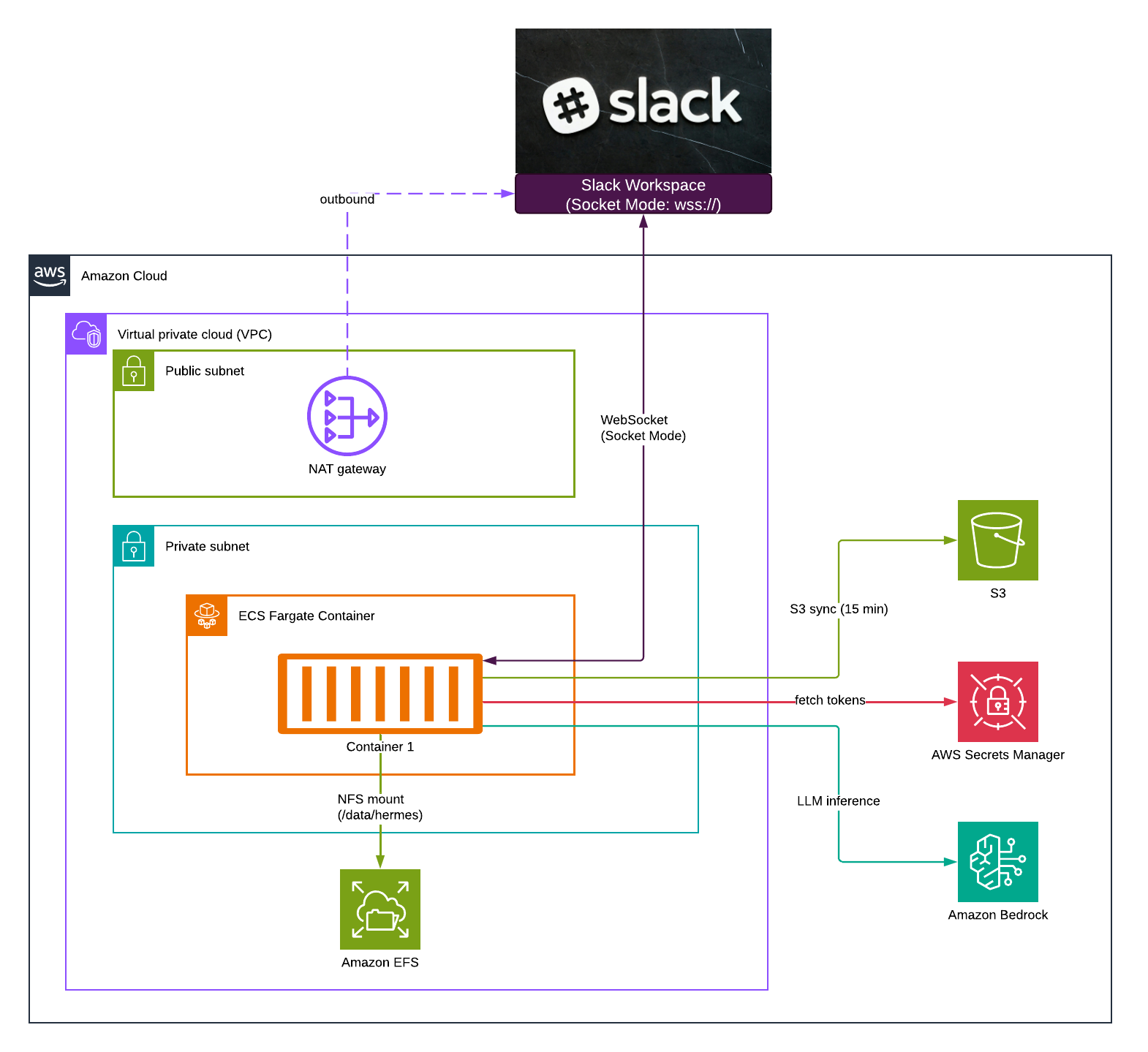
**Socket Mode eliminates 80% of networking complexity.** Traditional Slack bots need an inbound HTTP endpoint — meaning a load balancer, public IP, TLS certificate, and DNS. Socket Mode flips this: the container initiates an outbound WebSocket to Slack. No ALB ($16/month saved), no public IP, no cert management. The container sits in a private subnet and is unreachable from the internet.
**EFS persists agent state across deployments.** Hermes stores conversation memory in SQLite, learned skills as files, and user profiles on disk. Without EFS, every deployment wipes this state. With EFS, the agent remembers everything even after a fresh container starts.
**S3 decouples knowledge updates from container restarts.** Upload new docs to S3, and the agent picks them up within 15 minutes. No Docker build, no ECR push, no deployment. This is the key insight that makes the system operationally pleasant.
**Private subnet + NAT Gateway** gives an outbound-only security posture. The container can reach Slack, Bedrock, and S3 — but nothing on the internet can reach the container.
---
## Step 1: Create the Slack App
Before we touch AWS, let's create the Slack app and collect our tokens.
### 1.1 Create the App
1. Go to [api.slack.com/apps](https://api.slack.com/apps)
2. Click **"Create New App"** → **"From scratch"**
3. Name it (e.g., "Hermes"), select your workspace
### 1.2 Enable Socket Mode
1. Go to **Settings → Socket Mode**
2. Toggle **Enable Socket Mode** to ON
3. When prompted, create an app-level token:
- Name it `socket-mode`
- Add the `connections:write` scope
4. Click **Generate**
5. **Save this token** — it starts with `xapp-` (this is your `SLACK_APP_TOKEN`)
### 1.3 Add Bot Token Scopes
Go to **OAuth & Permissions → Scopes → Bot Token Scopes** and add:
| Scope | Why |
|-------|-----|
| `chat:write` | Send messages |
| `im:write` | Open DMs |
| `im:read` | Read DM conversations |
| `im:history` | Access DM message history |
| `app_mentions:read` | Respond to @mentions in channels |
| `channels:read` | List public channels |
### 1.4 Enable the Messages Tab (DMs)
Go to **App Home** and check **"Allow users to send Slash commands and messages from the messages tab"**. Without this, users cannot DM your bot — the message input won't appear.
### 1.5 Subscribe to Events
Go to **Event Subscriptions** → Toggle ON → Under **Subscribe to bot events**, add:
- `message.im` — Receive DM messages
- `app_mention` — Respond to @mentions in channels
> **This step is critical.** If you skip it, your bot's Socket Mode connection will succeed (you'll see logs), but no messages will ever arrive. The gateway runs, the container is healthy, yet the bot is deaf.
### 1.6 Install to Workspace
1. Go to **OAuth & Permissions**
2. Click **"Install to Workspace"**
3. Authorize the requested permissions
4. **Save the Bot User OAuth Token** — starts with `xoxb-` (this is your `SLACK_BOT_TOKEN`)
> **Any time you change scopes or event subscriptions**, you must reinstall the app. Slack won't apply changes until you do.
### 1.7 Test the App Exists
Open Slack, go to Apps, find your bot. Send it "hello" — it won't respond yet (no backend), but you should see it in the app list.
> **Keep both tokens safe.** We'll store them in AWS Secrets Manager next.
---
## Step 2: AWS Infrastructure with CDK
We'll use CDK (TypeScript) to create all AWS resources. The complete stack creates: VPC networking, EFS, S3, Secrets Manager, ECS Cluster, Fargate Service, and all IAM permissions.
### 2.1 Project Setup
```bash
mkdir hermes-infra && cd hermes-infra
npx cdk init app --language typescript
npm install aws-cdk-lib constructs
```
### 2.2 The Stack
Replace `lib/hermes-infra-stack.ts` with:
```typescript
import * as cdk from 'aws-cdk-lib';
import * as ec2 from 'aws-cdk-lib/aws-ec2';
import * as ecs from 'aws-cdk-lib/aws-ecs';
import * as efs from 'aws-cdk-lib/aws-efs';
import * as iam from 'aws-cdk-lib/aws-iam';
import * as logs from 'aws-cdk-lib/aws-logs';
import * as s3 from 'aws-cdk-lib/aws-s3';
import * as secretsmanager from 'aws-cdk-lib/aws-secretsmanager';
import { Construct } from 'constructs';

export class HermesAgentStack extends cdk.Stack {
  constructor(scope: Construct, id: string, props?: cdk.StackProps) {
    super(scope, id, props);

    // --- Networking ---
    // Use an existing VPC or create a new one.
    // If creating new: this provisions public + private subnets with a NAT Gateway.
    const vpc = new ec2.Vpc(this, 'HermesVpc', {
      maxAzs: 2,
      natGateways: 1,
    });

    // Security group: outbound HTTPS only (Slack, Bedrock, S3)
    const taskSg = new ec2.SecurityGroup(this, 'TaskSg', {
      vpc,
      description: 'Hermes Agent - outbound HTTPS only',
      allowAllOutbound: false,
    });
    taskSg.addEgressRule(ec2.Peer.anyIpv4(), ec2.Port.tcp(443), 'HTTPS outbound');

    // --- Storage ---

    // EFS for persistent state (memories, skills, SQLite)
    const fileSystem = new efs.FileSystem(this, 'HermesState', {
      vpc,
      encrypted: true,
      lifecyclePolicy: efs.LifecyclePolicy.AFTER_30_DAYS,
      removalPolicy: cdk.RemovalPolicy.RETAIN,
      performanceMode: efs.PerformanceMode.GENERAL_PURPOSE,
    });

    const accessPoint = fileSystem.addAccessPoint('HermesAccess', {
      path: '/hermes',
      createAcl: { ownerUid: '1000', ownerGid: '1000', permissions: '750' },
      posixUser: { uid: '1000', gid: '1000' },
    });

    // Allow Fargate task to reach EFS (NFS port 2049)
    fileSystem.connections.allowDefaultPortFrom(taskSg);

    // S3 bucket for knowledge base
    const knowledgeBucket = new s3.Bucket(this, 'KnowledgeBucket', {
      bucketName: `hermes-knowledge-${this.account}`,
      encryption: s3.BucketEncryption.S3_MANAGED,
      removalPolicy: cdk.RemovalPolicy.RETAIN,
    });

    // --- Secrets ---

    const slackBotToken = new secretsmanager.Secret(this, 'SlackBotToken', {
      secretName: 'hermes/slack-bot-token',
      description: 'Slack Bot OAuth Token (xoxb-...)',
    });

    const slackAppToken = new secretsmanager.Secret(this, 'SlackAppToken', {
      secretName: 'hermes/slack-app-token',
      description: 'Slack App-Level Token for Socket Mode (xapp-...)',
    });

    // --- ECS ---

    const cluster = new ecs.Cluster(this, 'Cluster', {
      vpc,
      clusterName: 'hermes-agent',
    });

    const taskDef = new ecs.FargateTaskDefinition(this, 'TaskDef', {
      cpu: 512,
      memoryLimitMiB: 1024,
      runtimePlatform: {
        cpuArchitecture: ecs.CpuArchitecture.X86_64,
        operatingSystemFamily: ecs.OperatingSystemFamily.LINUX,
      },
    });

    // --- IAM Permissions ---

    // Bedrock: invoke Claude models (wildcard region for cross-region inference)
    taskDef.taskRole.addToPrincipalPolicy(new iam.PolicyStatement({
      actions: [
        'bedrock:InvokeModel',
        'bedrock:InvokeModelWithResponseStream',
        'bedrock:ListFoundationModels',
        'bedrock:ListInferenceProfiles',
      ],
      resources: [
        'arn:aws:bedrock:*::foundation-model/anthropic.*',
        `arn:aws:bedrock:*:${this.account}:inference-profile/*`,
        `arn:aws:bedrock:*:${this.account}:application-inference-profile/*`,
      ],
    }));

    // S3: read knowledge bucket
    knowledgeBucket.grantRead(taskDef.taskRole);

    // EFS: mount and write
    taskDef.taskRole.addToPrincipalPolicy(new iam.PolicyStatement({
      actions: ['elasticfilesystem:ClientMount', 'elasticfilesystem:ClientWrite'],
      resources: [fileSystem.fileSystemArn],
    }));

    // --- EFS Volume ---

    taskDef.addVolume({
      name: 'hermes-state',
      efsVolumeConfiguration: {
        fileSystemId: fileSystem.fileSystemId,
        transitEncryption: 'ENABLED',
        authorizationConfig: {
          accessPointId: accessPoint.accessPointId,
          iam: 'ENABLED',
        },
      },
    });

    // --- Container ---

    const logGroup = new logs.LogGroup(this, 'Logs', {
      logGroupName: '/ecs/hermes-agent',
      retention: logs.RetentionDays.TWO_WEEKS,
      removalPolicy: cdk.RemovalPolicy.DESTROY,
    });

    const container = taskDef.addContainer('hermes', {
      image: ecs.ContainerImage.fromEcrRepository(
        cdk.aws_ecr.Repository.fromRepositoryName(this, 'Repo', 'hermes-agent'),
      ),
      environment: {
        HERMES_HOME: '/data/hermes',
        AWS_DEFAULT_REGION: 'us-east-1',
        KNOWLEDGE_BUCKET: knowledgeBucket.bucketName,
      },
      secrets: {
        SLACK_BOT_TOKEN: ecs.Secret.fromSecretsManager(slackBotToken),
        SLACK_APP_TOKEN: ecs.Secret.fromSecretsManager(slackAppToken),
      },
      logging: ecs.LogDrivers.awsLogs({
        streamPrefix: 'hermes',
        logGroup,
      }),
      healthCheck: {
        command: ['CMD-SHELL', 'true'],
        interval: cdk.Duration.seconds(60),
        timeout: cdk.Duration.seconds(5),
        retries: 3,
      },
    });

    container.addMountPoints({
      sourceVolume: 'hermes-state',
      containerPath: '/data/hermes',
      readOnly: false,
    });

    // --- Fargate Service ---

    new ecs.FargateService(this, 'GatewayService', {
      cluster,
      taskDefinition: taskDef,
      desiredCount: 1,
      securityGroups: [taskSg],
      vpcSubnets: { subnetType: ec2.SubnetType.PRIVATE_WITH_EGRESS },
      serviceName: 'hermes-gateway',
      enableExecuteCommand: true,
      circuitBreaker: { enable: true, rollback: true },
      minHealthyPercent: 0,
      maxHealthyPercent: 100,
    });

    // --- Outputs ---
    new cdk.CfnOutput(this, 'ClusterName', { value: cluster.clusterName });
    new cdk.CfnOutput(this, 'BucketName', { value: knowledgeBucket.bucketName });
    new cdk.CfnOutput(this, 'EfsId', { value: fileSystem.fileSystemId });
  }
}
```
### 2.3 Key Design Decisions in This Stack
| Choice | Rationale |
|--------|-----------|
| `allowAllOutbound: false` + explicit 443 | Least privilege. Only HTTPS traffic leaves the container. |
| `efs.LifecyclePolicy.AFTER_30_DAYS` | Cold memories move to cheaper IA storage automatically. |
| `removalPolicy: RETAIN` on EFS | A `cdk destroy` won't wipe your agent's memory. |
| `enableExecuteCommand: true` | Allows `aws ecs execute-command` to SSH into the container for debugging. |
| `minHealthyPercent: 0` | Allows full replacement of the single task during deploys (no spare capacity needed). |
| Health check `CMD-SHELL true` | No HTTP port exists (Socket Mode only). We just need liveness. |
| Bedrock resource ARN with `*` region | Cross-region inference profiles can route to any region. |
### 2.4 Deploy Infrastructure
```bash
# Create the ECR repository first (one-time)
aws ecr create-repository --repository-name hermes-agent --region us-east-1

# Bootstrap CDK (first time only)
npx cdk bootstrap

# Deploy
npx cdk deploy
```
### 2.5 Store Your Slack Tokens
After deployment creates the secrets, populate them:
```bash
aws secretsmanager put-secret-value \
  --secret-id hermes/slack-bot-token \
  --secret-string "xoxb-your-bot-token-here"

aws secretsmanager put-secret-value \
  --secret-id hermes/slack-app-token \
  --secret-string "xapp-your-app-token-here"
```
---
## Step 3: Docker Image
### 3.1 Dockerfile
Create a `docker/` directory with this `Dockerfile`:
```dockerfile
FROM python:3.11-slim AS base

# Optional: custom CA certificate injection (for corporate proxies)
ARG CUSTOM_CA_CERT_BASE64
RUN if [ -n "$CUSTOM_CA_CERT_BASE64" ]; then \
    echo "$CUSTOM_CA_CERT_BASE64" | base64 -d > /usr/local/share/ca-certificates/custom.crt && \
    update-ca-certificates; \
    fi

# System dependencies
RUN apt-get update && apt-get install -y --no-install-recommends \
    curl git ripgrep ca-certificates unzip \
    && rm -rf /var/lib/apt/lists/*

# AWS CLI v2 (for S3 sync in entrypoint)
RUN curl -sS "https://awscli.amazonaws.com/awscli-exe-linux-x86_64.zip" -o "awscliv2.zip" \
    && unzip -q awscliv2.zip && ./aws/install && rm -rf aws awscliv2.zip

# Node.js 20 (required for MCP servers which run via npx)
RUN curl -fsSL https://deb.nodesource.com/setup_20.x | bash - \
    && apt-get install -y nodejs \
    && rm -rf /var/lib/apt/lists/*

# Install uv (fast Python package manager) and Hermes Agent
ENV SSL_CERT_FILE=/etc/ssl/certs/ca-certificates.crt
ENV REQUESTS_CA_BUNDLE=/etc/ssl/certs/ca-certificates.crt
RUN curl -LsSf https://astral.sh/uv/install.sh | sh \
    && /root/.local/bin/uv pip install --system \
       "hermes-agent[all]" \
       slack-bolt \
       slack-sdk \
       "anthropic[bedrock]>=0.39.0"
ENV PATH="/root/.local/bin:$PATH"

# Non-root user (UID 1000 matches EFS access point)
RUN useradd -m -u 1000 hermes
USER hermes
WORKDIR /home/hermes

ENV HERMES_HOME=/data/hermes

# Copy configuration and entrypoint
COPY --chown=hermes:hermes config.yaml /home/hermes/config.yaml
COPY --chown=hermes:hermes --chmod=755 entrypoint.sh /home/hermes/entrypoint.sh

ENTRYPOINT ["/home/hermes/entrypoint.sh"]
```
### 3.2 Why Each Layer
- **python:3.11-slim**: Small base, fewer CVEs than full image
- **ripgrep**: Hermes uses it for fast text search in knowledge files
- **AWS CLI v2**: The entrypoint syncs knowledge from S3 at runtime
- **Node.js 20**: MCP servers (like Jira, GitHub integrations) run via `npx`
- **uv**: 10–100x faster than pip for package installation
- **`hermes-agent[all]`**: Full agent framework with all extras (memory, MCP, vision, audio)
- **`anthropic[bedrock]`**: Enables Bedrock as the inference provider (IAM auth, no API key needed)
- **UID 1000**: Matches the EFS access point — files written by the container are owned correctly
### 3.3 Build and Push
```bash
cd docker/

# Build (use --platform on Apple Silicon)
docker build --platform linux/amd64 -t hermes-agent:latest .

# Login to ECR
aws ecr get-login-password --region us-east-1 | \
  docker login --username AWS --password-stdin \
  <YOUR_ACCOUNT_ID>.dkr.ecr.us-east-1.amazonaws.com

# Tag and push
docker tag hermes-agent:latest \
  <YOUR_ACCOUNT_ID>.dkr.ecr.us-east-1.amazonaws.com/hermes-agent:latest
docker push \
  <YOUR_ACCOUNT_ID>.dkr.ecr.us-east-1.amazonaws.com/hermes-agent:latest
```
> **Apple Silicon note**: The `--platform linux/amd64` flag is required. Fargate only supports x86_64 images. Cross-compilation adds ~2 minutes to build time.
---
## Step 4: Configuration
Create `docker/config.yaml`:
```yaml
model:
  provider: bedrock
  default: us.anthropic.claude-sonnet-4-6   # or claude-opus-4-7 for best quality

agent:
  max_turns: 50
  reasoning_effort: medium
  system_prompt: |
    You are a helpful AI assistant. You have access to files on disk
    and can execute terminal commands to find information.

    When asked a question:
    1. Check if relevant files exist in /data/hermes/knowledge/ or /data/hermes/projects/
    2. Read those files using terminal commands
    3. Synthesize your answer from what you find
    4. If you cannot find information, say so explicitly

memory:
  memory_enabled: true
  user_profile_enabled: true
  memory_char_limit: 2200
  user_char_limit: 1375

terminal:
  backend: local
  timeout: 180
  cwd: /data/hermes    # CRITICAL: must match your EFS mount path

compression:
  enabled: true
  threshold: 0.50
  target_ratio: 0.20

display:
  streaming: false
  show_cost: true

security:
  redact_secrets: true

gateway:
  slack:
    enabled: true

# Optional: add MCP servers for external tool integrations
# mcp_servers:
#   github:
#     command: npx
#     args: ["-y", "@modelcontextprotocol/server-github"]
#     env:
#       GITHUB_PERSONAL_ACCESS_TOKEN: "${GITHUB_TOKEN}"
```
### Configuration Deep Dive
| Field | What It Does | Why It Matters |
|-------|-------------|---------------|
| `model.provider: bedrock` | Use AWS Bedrock for inference | IAM auth, no API key management |
| `terminal.cwd: /data/hermes` | Working directory AND context discovery root | **If wrong, the agent loses all project context** |
| `compression.enabled` | Compresses long conversations | Prevents context window overflow in extended sessions |
| `gateway.slack.enabled` | Activates Slack Socket Mode listener | The whole point of this deployment |
| `memory_enabled` | Persists learnings across conversations | Agent improves over time, remembers preferences |
| `reasoning_effort: medium` | Balances quality and cost | Use `high` for complex multi-step tasks |
> **Critical**: `terminal.cwd` serves a dual purpose. It sets the working directory for terminal commands AND is the starting point for discovering `.hermes.md` (your project context file). If this doesn't point to your EFS mount, the agent has no project context.
---
## Step 5: The Entrypoint Script
Create `docker/entrypoint.sh`:
```bash
#!/bin/bash
set -e

HERMES_HOME="${HERMES_HOME:-/data/hermes}"

# Initialize HERMES_HOME (always update config from image)
mkdir -p "$HERMES_HOME/memories" "$HERMES_HOME/skills"
cp /home/hermes/config.yaml "$HERMES_HOME/config.yaml"

# S3 knowledge sync function
sync_knowledge() {
    if [ -z "$KNOWLEDGE_BUCKET" ]; then return; fi

    echo "[$(date -u +%H:%M:%S)] Syncing knowledge from s3://$KNOWLEDGE_BUCKET..."

    mkdir -p "$HERMES_HOME/knowledge" "$HERMES_HOME/projects"

    # Sync knowledge notes (--delete removes stale files)
    aws s3 sync "s3://$KNOWLEDGE_BUCKET/knowledge/" "$HERMES_HOME/knowledge/" \
        --delete --quiet 2>/dev/null || true

    # Sync project docs
    aws s3 sync "s3://$KNOWLEDGE_BUCKET/projects/" "$HERMES_HOME/projects/" \
        --quiet 2>/dev/null || true

    # Compose SOUL.md (agent identity, loaded by gateway at startup)
    cat > "$HERMES_HOME/SOUL.md" << 'IDENTITY'
# Hermes — Your Knowledge Assistant

You are a knowledge assistant with access to project documentation and notes stored on disk.

Your primary job is to answer questions by reading files — never from general knowledge alone.

When asked about any topic:
1. Search for relevant files using terminal commands (grep, cat, ls)
2. Read and synthesize your answer from those files
3. If you cannot find the information, say so explicitly

Key paths:
- `/data/hermes/knowledge/` — Topic-specific knowledge notes
- `/data/hermes/projects/` — Project documentation
IDENTITY
    echo "[$(date -u +%H:%M:%S)] SOUL.md composed"
}

# Initial sync at boot
sync_knowledge

# Periodic re-sync every 15 minutes (background)
(
    while true; do
        sleep 900
        sync_knowledge
    done
) &

# Write .env for gateway credentials
cat > "$HERMES_HOME/.env" << EOF
SLACK_BOT_TOKEN=${SLACK_BOT_TOKEN}
SLACK_APP_TOKEN=${SLACK_APP_TOKEN}
GATEWAY_ALLOW_ALL_USERS=true
EOF

# Start gateway in foreground mode
exec hermes gateway run
```
### Boot Sequence Explained
```
Container Start
  │
  ├─ 1. Create directories: memories/, skills/
  ├─ 2. Copy config.yaml from image → EFS (always fresh)
  ├─ 3. S3 sync: download knowledge/, projects/
  ├─ 4. Compose SOUL.md (agent identity)
  ├─ 5. Start background sync loop (every 15 min)
  ├─ 6. Write .env (Slack tokens)
  └─ 7. exec hermes gateway run
              │
              └─ Connects to Slack via Socket Mode
                 Listens for DMs and @mentions
```
**Why always overwrite config.yaml?** EFS is persistent. If you deployed a bad config once, it would stick forever. By always copying from the image, you guarantee that a fresh deploy always brings fresh configuration.
**Why `exec`?** The `exec` command replaces the shell process with the Hermes gateway. This means signals (SIGTERM from ECS during deployment) propagate directly to Hermes, enabling graceful shutdown.
**Why `|| true` on S3 sync?** If the bucket is empty or the agent starts before knowledge is uploaded, we don't want the container to crash. It will try again in 15 minutes.
---
## Step 6: The Knowledge System
This is what makes the deployment truly useful. Hermes loads context from three independent slots:
| Slot | File | Char Limit | Purpose |
|------|------|-----------|---------|
| **Identity** | `SOUL.md` | 20,000 | Who the agent is. Personality, key behaviors, available paths. |
| **Project Context** | `.hermes.md` | 20,000 | Domain knowledge. Loaded via `terminal.cwd` discovery. |
| **System Prompt** | `config.yaml` | None | Behavioral rules. Task-specific instructions. |
### How SOUL.md Works
When the gateway starts, it looks for `SOUL.md` in `$HERMES_HOME`. This file defines the agent's identity — think of it as the "who you are" prompt. It's always loaded into every conversation, capped at 20,000 characters.
Our entrypoint composes it at boot from a heredoc. You could also sync it from S3 for dynamic updates.
### How .hermes.md Works (Optional)
If you create a file called `.hermes.md` at the `terminal.cwd` path (`/data/hermes/.hermes.md`), Hermes will automatically discover and load it as project context. This is useful for providing high-level documentation that should always be in context.
### Knowledge Update Workflow (No Redeploy)
```
1. Upload files to S3:
   aws s3 sync ./my-docs/ s3://hermes-knowledge-<ACCOUNT_ID>/knowledge/

2. Wait 15 minutes (background sync picks it up)
   — OR —
   Force immediate pickup:
   aws ecs update-service --cluster hermes-agent \
     --service hermes-gateway --force-new-deployment
```
This is the key operational advantage: your agent's knowledge evolves independently of its container. Write a new doc, upload to S3, and the agent knows about it within 15 minutes.
---
## Step 7: Deploy and Test
### 7.1 Trigger Deployment
If you already pushed the image and deployed infrastructure:
```bash
aws ecs update-service \
  --cluster hermes-agent \
  --service hermes-gateway \
  --force-new-deployment
```
### 7.2 Watch Logs
```bash
aws logs tail /ecs/hermes-agent --since 5m --follow
```
**Success indicators:**
```
[14:30:01] Syncing knowledge from s3://hermes-knowledge-...
[14:30:05] SOUL.md composed
```
If you see the gateway start without errors, the agent is live.
### 7.3 Talk to Your Agent
Open Slack, find your bot in the Apps section (or DM it directly), and send:
> Hello! What can you do?
You should get a response from Claude describing its capabilities.
### 7.4 Debug with ECS Exec
If something goes wrong, shell into the running container:
```bash
# Get the task ID
TASK_ID=$(aws ecs list-tasks --cluster hermes-agent \
  --service-name hermes-gateway --query 'taskArns[0]' --output text | \
  awk -F'/' '{print $NF}')

# Shell in
aws ecs execute-command \
  --cluster hermes-agent \
  --task $TASK_ID \
  --container hermes \
  --interactive \
  --command "/bin/bash"
```
Inside the container, check:
```bash
cat /data/hermes/config.yaml       # Config loaded correctly?
cat /data/hermes/SOUL.md           # Identity composed?
ls /data/hermes/knowledge/         # Knowledge synced?
cat /data/hermes/.env              # Tokens present?
```
---
## Troubleshooting
These are all real issues I hit during deployment. Each one cost me 30+ minutes the first time.
### 1. SSL/TLS Errors During Docker Build
**Symptom:** `pip install` or `curl` fails with `SSL certificate problem: unable to get local issuer certificate`
**Root Cause:** Corporate VPN or proxy injecting a custom CA certificate that Docker's build environment doesn't trust.
**Solution:** Pass your custom CA cert as a base64 build arg:
```bash
docker build \
  --build-arg CUSTOM_CA_CERT_BASE64=$(base64 < /path/to/your-ca-cert.pem) \
  --platform linux/amd64 \
  -t hermes-agent:latest .
```
Also: the `ENV SSL_CERT_FILE` and `ENV REQUESTS_CA_BUNDLE` in the Dockerfile handle Rust-based tools (like `uv`) that maintain their own cert store.
### 2. S3 Sync Silently Fails
**Symptom:** Knowledge files never appear on EFS, but no errors in logs (because of `|| true`).
**Root Cause:** IAM task role has `s3:GetObject` but is missing `s3:ListBucket`. The sync command needs to list before it can download.
**Solution:** Use CDK's `bucket.grantRead()` which grants both `s3:GetObject*` and `s3:ListBucket`. If you crafted IAM manually, add both.
### 3. ECS Task Stuck in PROVISIONING
**Symptom:** Task never reaches RUNNING status. Stays in PROVISIONING for minutes, then fails.
**Root Cause:** Security group doesn't allow NFS traffic (port 2049) between the Fargate task and the EFS file system.
**Solution:** In CDK, use `fileSystem.connections.allowDefaultPortFrom(taskSg)`. This automatically creates the correct security group rule. If you're using CloudFormation directly, add an ingress rule on the EFS security group allowing port 2049 from the task security group.
### 4. Slack "missing_scope" Errors
**Symptom:** Bot connects but logs show `'error': 'missing_scope', 'needed': 'im:history'`.
**Root Cause:** Scopes were added AFTER the app was already installed to the workspace. Scope changes require re-installation.
**Solution:** After adding new scopes in the Slack app settings, go to **OAuth & Permissions** and click **"Reinstall to Workspace"**. This regenerates the bot token with the new scopes.
### 5. Agent Has No Project Context (.hermes.md Not Loading)
**Symptom:** Agent responds but seems to have no knowledge of your projects. SOUL.md loads fine, but .hermes.md is ignored.
**Root Cause:** `terminal.cwd` in config.yaml doesn't point to where `.hermes.md` lives. Hermes discovers `.hermes.md` by walking up from `terminal.cwd`.
**Solution:** Ensure `terminal.cwd: /data/hermes` in your config.yaml AND that `.hermes.md` exists at `/data/hermes/.hermes.md`.
### 6. MCP Server Fails to Start
**Symptom:** `"Failed to start MCP server"` in logs. Agent works but external tools are unavailable.
**Root Cause:** Node.js is not installed in the container. MCP servers run via `npx` which requires Node.js.
**Solution:** Include the Node.js installation step in your Dockerfile. Also verify outbound HTTPS works (npx downloads packages from npm registry on first run).
### 7. Bedrock AccessDeniedException
**Symptom:** Agent connects to Slack but every response is an error. Logs show `AccessDeniedException` from Bedrock.
**Root Cause:** IAM policy restricts Bedrock access to a single region, but cross-region inference profiles (the `us.` prefix models) route to any region.
**Solution:** Use wildcard `*` for the region portion of the Bedrock resource ARN:
```
arn:aws:bedrock:*::foundation-model/anthropic.*
arn:aws:bedrock:*:<ACCOUNT>:inference-profile/*
```
### 8. Container Keeps Restarting (Health Check Failure)
**Symptom:** ECS repeatedly stops and restarts the task. Logs show "container marked unhealthy."
**Root Cause:** Default health check expects an HTTP response, but Hermes has no HTTP port — it only uses outbound WebSocket (Socket Mode).
**Solution:** Use `CMD-SHELL true` as the health check command. This always passes. You rely on the circuit breaker for actual failure detection (crash loop protection).
### 9. Config Changes Not Taking Effect
**Symptom:** You updated `config.yaml`, rebuilt the image, pushed, and force-deployed. But the agent still behaves with old config.
**Root Cause:** The Hermes gateway caches the `AIAgent` object at startup. Even though the entrypoint overwrites `config.yaml` on EFS, the gateway only reads it once.
**Solution:** Force a new deployment: `aws ecs update-service --force-new-deployment`. This kills the old task and starts fresh. Knowledge changes (S3 files read at query time) don't need restarts — only config changes do.
---
## Cost Breakdown
| Resource | Monthly Cost |
|----------|-------------|
| ECS Fargate (512 CPU, 1024 MiB, 24/7) | ~$15 |
| NAT Gateway (fixed hourly + data transfer) | ~$35–45 |
| EFS (1 GB, mostly Infrequent Access) | ~$0.50 |
| S3 (10 MB knowledge files) | ~$0.01 |
| Secrets Manager (2 secrets) | ~$0.80 |
| CloudWatch Logs (2 weeks retention) | ~$1–3 |
| **Subtotal (infrastructure)** | **~$55–65** |
| Bedrock inference (varies by usage) | $5–100+ |
### Cost Optimization Tips
**NAT Gateway is the biggest fixed cost.** For personal projects, consider:
- A **NAT Instance** on `t4g.nano` (~$4/month) instead of a managed NAT Gateway
- Or deploy in a **public subnet** with a public IP (simpler but less secure)
**Use Sonnet instead of Opus** for routine queries. Opus costs 5–10x more per token. Save Opus for complex reasoning tasks.
**EFS Infrequent Access** automatically moves files untouched for 30 days to cheaper storage (from $0.30/GB to $0.025/GB).
---
## Next Steps
Once your agent is running, here's what to explore:
**Add MCP Servers** — Give your agent tools. Jira, GitHub, Linear, databases — anything with an MCP-compatible server. Add them to the `mcp_servers:` section of config.yaml.
**Automate Knowledge Updates** — Set up a CI/CD pipeline that syncs documentation to S3 on every merge. Your agent's knowledge stays current without manual intervention.
**Multi-Agent Architecture** — Run a second Hermes instance with a different `SOUL.md` and config. One agent for engineering questions, another for project management, another for code review.
**Scheduled Tasks** — Use EventBridge to periodically invoke prompts. Daily standup summaries, weekly reports, automated checks.
**Access Control** — Set `GATEWAY_ALLOW_ALL_USERS=false` and configure an allowlist. Restrict which Slack users can interact with the agent.
---
## Wrapping Up
What we've built is a production-grade AI assistant deployment: always-on, team-accessible, with persistent memory and a self-updating knowledge base. The Socket Mode architecture eliminates the typical networking headaches of Slack bots, and the S3 knowledge sync means your agent gets smarter without redeployments.
The entire infrastructure is defined as code (CDK), the container is reproducible (Docker), and the knowledge system is just files in a bucket. No vendor lock-in beyond AWS Bedrock for inference — and even that could be swapped by changing `model.provider` in config.yaml.
If you want to see the Hermes Agent project: [github.com/NousResearch/hermes-agent](https://github.com/NousResearch/hermes-agent).
Happy deploying.
A May 2026 field guide to running your own AI agent on AWS. The infrastructure and gotchas are real, but the upstream image and configuration must be re-checked before a new deployment.
Review note (2026-08-28): This article records a deployment from May 23, 2026. Hermes now documents a supported Docker path using the nousresearch/hermes-agent image and persistent data mounted at /opt/data; schema migrations can create backups. The ECS/CDK architecture below is illustrative for this snapshot. Inspect the current release page and configuration reference before copying it, and never overwrite a mounted config or secret store blindly.
Most AI agent tutorials end at “run it locally.” That’s fine for demos, but useless for teams. You want an always-on assistant that your team can DM on Slack, that remembers past conversations, that can read your documentation and use external tools — and that doesn’t die when your laptop goes to sleep.
This post documents how I deployed Hermes Agent — an open-source AI agent framework by NousResearch — to AWS ECS Fargate, connected it to Slack via Socket Mode, backed it with Claude on Bedrock, and gave it persistent memory on EFS with a knowledge base on S3. The code blocks are copy-paste-able for that May snapshot only; validate image tags, configuration keys, and mount paths against the current upstream docs. Every gotcha is one I actually hit.
What You’ll Build
A single Hermes Agent running on ECS Fargate that:
Connects to your Slack workspace via Socket Mode (DMs and @mentions)
Uses Claude (Sonnet or Opus) via Amazon Bedrock for inference
Persists memory and learned skills on EFS across restarts
Syncs a knowledge base from S3 every 15 minutes (no redeploy needed for updates)
Supports MCP servers for external tool integration (Jira, GitHub, etc.)
Estimated monthly cost: ~$55–65 (excluding Bedrock inference, which varies by usage).
Prerequisites
AWS account with Bedrock model access enabled (Claude models in us-east-1)
AWS CLI v2 configured with credentials
Node.js 18+ and npm (for CDK)
Docker Desktop
A Slack workspace where you can install apps
Basic familiarity with CDK, Docker, and ECS concepts
Important: Enable Bedrock model access first. Go to AWS Console → Bedrock → Model access → Request access to Anthropic Claude models. This can take minutes to hours.
Architecture Overview
Why This Architecture?
Socket Mode eliminates 80% of networking complexity. Traditional Slack bots need an inbound HTTP endpoint — meaning a load balancer, public IP, TLS certificate, and DNS. Socket Mode flips this: the container initiates an outbound WebSocket to Slack. No ALB ($16/month saved), no public IP, no cert management. The container sits in a private subnet and is unreachable from the internet.
EFS persists agent state across deployments. Hermes stores conversation memory in SQLite, learned skills as files, and user profiles on disk. Without EFS, every deployment wipes this state. With EFS, the agent remembers everything even after a fresh container starts.
S3 decouples knowledge updates from container restarts. Upload new docs to S3, and the agent picks them up within 15 minutes. No Docker build, no ECR push, no deployment. This is the key insight that makes the system operationally pleasant.
Private subnet + NAT Gateway gives an outbound-only security posture. The container can reach Slack, Bedrock, and S3 — but nothing on the internet can reach the container.
Step 1: Create the Slack App
Before we touch AWS, let’s create the Slack app and collect our tokens.
Save this token — it starts with xapp- (this is your SLACK_APP_TOKEN)
1.3 Add Bot Token Scopes
Go to OAuth & Permissions → Scopes → Bot Token Scopes and add:
Scope
Why
chat:write
Send messages
im:write
Open DMs
im:read
Read DM conversations
im:history
Access DM message history
app_mentions:read
Respond to @mentions in channels
channels:read
List public channels
1.4 Enable the Messages Tab (DMs)
Go to App Home and check “Allow users to send Slash commands and messages from the messages tab”. Without this, users cannot DM your bot — the message input won’t appear.
1.5 Subscribe to Events
Go to Event Subscriptions → Toggle ON → Under Subscribe to bot events, add:
message.im — Receive DM messages
app_mention — Respond to @mentions in channels
This step is critical. If you skip it, your bot’s Socket Mode connection will succeed (you’ll see logs), but no messages will ever arrive. The gateway runs, the container is healthy, yet the bot is deaf.
1.6 Install to Workspace
Go to OAuth & Permissions
Click “Install to Workspace”
Authorize the requested permissions
Save the Bot User OAuth Token — starts with xoxb- (this is your SLACK_BOT_TOKEN)
Any time you change scopes or event subscriptions, you must reinstall the app. Slack won’t apply changes until you do.
1.7 Test the App Exists
Open Slack, go to Apps, find your bot. Send it “hello” — it won’t respond yet (no backend), but you should see it in the app list.
Keep both tokens safe. We’ll store them in AWS Secrets Manager next.
Step 2: AWS Infrastructure with CDK
We’ll use CDK (TypeScript) to create all AWS resources. The complete stack creates: VPC networking, EFS, S3, Secrets Manager, ECS Cluster, Fargate Service, and all IAM permissions.
model:provider:bedrockdefault:us.anthropic.claude-sonnet-4-6 # or claude-opus-4-7 for best qualityagent:max_turns:50reasoning_effort:mediumsystem_prompt:| You are a helpful AI assistant. You have access to files on disk
and can execute terminal commands to find information.
When asked a question:
1. Check if relevant files exist in /data/hermes/knowledge/ or /data/hermes/projects/
2. Read those files using terminal commands
3. Synthesize your answer from what you find
4. If you cannot find information, say so explicitlymemory:memory_enabled:trueuser_profile_enabled:truememory_char_limit:2200user_char_limit:1375terminal:backend:localtimeout:180cwd: /data/hermes # CRITICAL:must match your EFS mount pathcompression:enabled:truethreshold:0.50target_ratio:0.20display:streaming:falseshow_cost:truesecurity:redact_secrets:truegateway:slack:enabled:true# Optional: add MCP servers for external tool integrations# mcp_servers:# github:# command: npx# args: ["-y", "@modelcontextprotocol/server-github"]# env:# GITHUB_PERSONAL_ACCESS_TOKEN: "${GITHUB_TOKEN}"
Configuration Deep Dive
Field
What It Does
Why It Matters
model.provider: bedrock
Use AWS Bedrock for inference
IAM auth, no API key management
terminal.cwd: /data/hermes
Working directory AND context discovery root
If wrong, the agent loses all project context
compression.enabled
Compresses long conversations
Prevents context window overflow in extended sessions
gateway.slack.enabled
Activates Slack Socket Mode listener
The whole point of this deployment
memory_enabled
Persists learnings across conversations
Agent improves over time, remembers preferences
reasoning_effort: medium
Balances quality and cost
Use high for complex multi-step tasks
Critical: terminal.cwd serves a dual purpose. It sets the working directory for terminal commands AND is the starting point for discovering .hermes.md (your project context file). If this doesn’t point to your EFS mount, the agent has no project context.
#!/bin/bash
set -e
HERMES_HOME="${HERMES_HOME:-/data/hermes}"# Initialize HERMES_HOME (always update config from image)mkdir -p "$HERMES_HOME/memories""$HERMES_HOME/skills"cp /home/hermes/config.yaml "$HERMES_HOME/config.yaml"# S3 knowledge sync functionsync_knowledge(){if[ -z "$KNOWLEDGE_BUCKET"];thenreturn;fiecho"[$(date -u +%H:%M:%S)] Syncing knowledge from s3://$KNOWLEDGE_BUCKET..." mkdir -p "$HERMES_HOME/knowledge""$HERMES_HOME/projects"# Sync knowledge notes (--delete removes stale files) aws s3 sync "s3://$KNOWLEDGE_BUCKET/knowledge/""$HERMES_HOME/knowledge/"\
--delete --quiet 2>/dev/null ||true# Sync project docs aws s3 sync "s3://$KNOWLEDGE_BUCKET/projects/""$HERMES_HOME/projects/"\
--quiet 2>/dev/null ||true# Compose SOUL.md (agent identity, loaded by gateway at startup) cat > "$HERMES_HOME/SOUL.md"<< 'IDENTITY'
# Hermes — Your Knowledge Assistant
You are a knowledge assistant with access to project documentation and notes stored on disk.
Your primary job is to answer questions by reading files — never from general knowledge alone.
When asked about any topic:
1. Search for relevant files using terminal commands (grep, cat, ls)
2. Read and synthesize your answer from those files
3. If you cannot find the information, say so explicitly
Key paths:
- `/data/hermes/knowledge/` — Topic-specific knowledge notes
- `/data/hermes/projects/` — Project documentation
IDENTITYecho"[$(date -u +%H:%M:%S)] SOUL.md composed"}# Initial sync at bootsync_knowledge
# Periodic re-sync every 15 minutes (background)(while true;do sleep 900 sync_knowledge
done)&# Write .env for gateway credentialscat > "$HERMES_HOME/.env"<< EOF
SLACK_BOT_TOKEN=${SLACK_BOT_TOKEN}
SLACK_APP_TOKEN=${SLACK_APP_TOKEN}
GATEWAY_ALLOW_ALL_USERS=true
EOF# Start gateway in foreground modeexec hermes gateway run
Why always overwrite config.yaml? EFS is persistent. If you deployed a bad config once, it would stick forever. By always copying from the image, you guarantee that a fresh deploy always brings fresh configuration.
Why exec? The exec command replaces the shell process with the Hermes gateway. This means signals (SIGTERM from ECS during deployment) propagate directly to Hermes, enabling graceful shutdown.
Why || true on S3 sync? If the bucket is empty or the agent starts before knowledge is uploaded, we don’t want the container to crash. It will try again in 15 minutes.
Step 6: The Knowledge System
This is what makes the deployment truly useful. Hermes loads context from three independent slots:
Slot
File
Char Limit
Purpose
Identity
SOUL.md
20,000
Who the agent is. Personality, key behaviors, available paths.
Project Context
.hermes.md
20,000
Domain knowledge. Loaded via terminal.cwd discovery.
System Prompt
config.yaml
None
Behavioral rules. Task-specific instructions.
How SOUL.md Works
When the gateway starts, it looks for SOUL.md in $HERMES_HOME. This file defines the agent’s identity — think of it as the “who you are” prompt. It’s always loaded into every conversation, capped at 20,000 characters.
Our entrypoint composes it at boot from a heredoc. You could also sync it from S3 for dynamic updates.
How .hermes.md Works (Optional)
If you create a file called .hermes.md at the terminal.cwd path (/data/hermes/.hermes.md), Hermes will automatically discover and load it as project context. This is useful for providing high-level documentation that should always be in context.
Knowledge Update Workflow (No Redeploy)
1. Upload files to S3:
aws s3 sync ./my-docs/ s3://hermes-knowledge-<ACCOUNT_ID>/knowledge/
2. Wait 15 minutes (background sync picks it up)
— OR —
Force immediate pickup:
aws ecs update-service --cluster hermes-agent \
--service hermes-gateway --force-new-deployment
This is the key operational advantage: your agent’s knowledge evolves independently of its container. Write a new doc, upload to S3, and the agent knows about it within 15 minutes.
Step 7: Deploy and Test
7.1 Trigger Deployment
If you already pushed the image and deployed infrastructure:
Also: the ENV SSL_CERT_FILE and ENV REQUESTS_CA_BUNDLE in the Dockerfile handle Rust-based tools (like uv) that maintain their own cert store.
2. S3 Sync Silently Fails
Symptom: Knowledge files never appear on EFS, but no errors in logs (because of || true).
Root Cause: IAM task role has s3:GetObject but is missing s3:ListBucket. The sync command needs to list before it can download.
Solution: Use CDK’s bucket.grantRead() which grants both s3:GetObject* and s3:ListBucket. If you crafted IAM manually, add both.
3. ECS Task Stuck in PROVISIONING
Symptom: Task never reaches RUNNING status. Stays in PROVISIONING for minutes, then fails.
Root Cause: Security group doesn’t allow NFS traffic (port 2049) between the Fargate task and the EFS file system.
Solution: In CDK, use fileSystem.connections.allowDefaultPortFrom(taskSg). This automatically creates the correct security group rule. If you’re using CloudFormation directly, add an ingress rule on the EFS security group allowing port 2049 from the task security group.
4. Slack “missing_scope” Errors
Symptom: Bot connects but logs show 'error': 'missing_scope', 'needed': 'im:history'.
Root Cause: Scopes were added AFTER the app was already installed to the workspace. Scope changes require re-installation.
Solution: After adding new scopes in the Slack app settings, go to OAuth & Permissions and click “Reinstall to Workspace”. This regenerates the bot token with the new scopes.
5. Agent Has No Project Context (.hermes.md Not Loading)
Symptom: Agent responds but seems to have no knowledge of your projects. SOUL.md loads fine, but .hermes.md is ignored.
Root Cause:terminal.cwd in config.yaml doesn’t point to where .hermes.md lives. Hermes discovers .hermes.md by walking up from terminal.cwd.
Solution: Ensure terminal.cwd: /data/hermes in your config.yaml AND that .hermes.md exists at /data/hermes/.hermes.md.
6. MCP Server Fails to Start
Symptom:"Failed to start MCP server" in logs. Agent works but external tools are unavailable.
Root Cause: Node.js is not installed in the container. MCP servers run via npx which requires Node.js.
Solution: Include the Node.js installation step in your Dockerfile. Also verify outbound HTTPS works (npx downloads packages from npm registry on first run).
7. Bedrock AccessDeniedException
Symptom: Agent connects to Slack but every response is an error. Logs show AccessDeniedException from Bedrock.
Root Cause: IAM policy restricts Bedrock access to a single region, but cross-region inference profiles (the us. prefix models) route to any region.
Solution: Use wildcard * for the region portion of the Bedrock resource ARN:
Symptom: ECS repeatedly stops and restarts the task. Logs show “container marked unhealthy.”
Root Cause: Default health check expects an HTTP response, but Hermes has no HTTP port — it only uses outbound WebSocket (Socket Mode).
Solution: Use CMD-SHELL true as the health check command. This always passes. You rely on the circuit breaker for actual failure detection (crash loop protection).
9. Config Changes Not Taking Effect
Symptom: You updated config.yaml, rebuilt the image, pushed, and force-deployed. But the agent still behaves with old config.
Root Cause: The Hermes gateway caches the AIAgent object at startup. Even though the entrypoint overwrites config.yaml on EFS, the gateway only reads it once.
Solution: Force a new deployment: aws ecs update-service --force-new-deployment. This kills the old task and starts fresh. Knowledge changes (S3 files read at query time) don’t need restarts — only config changes do.
Cost Breakdown
Resource
Monthly Cost
ECS Fargate (512 CPU, 1024 MiB, 24/7)
~$15
NAT Gateway (fixed hourly + data transfer)
~$35–45
EFS (1 GB, mostly Infrequent Access)
~$0.50
S3 (10 MB knowledge files)
~$0.01
Secrets Manager (2 secrets)
~$0.80
CloudWatch Logs (2 weeks retention)
~$1–3
Subtotal (infrastructure)
~$55–65
Bedrock inference (varies by usage)
$5–100+
Cost Optimization Tips
NAT Gateway is the biggest fixed cost. For personal projects, consider:
A NAT Instance on t4g.nano (~$4/month) instead of a managed NAT Gateway
Or deploy in a public subnet with a public IP (simpler but less secure)
Use Sonnet instead of Opus for routine queries. Opus costs 5–10x more per token. Save Opus for complex reasoning tasks.
EFS Infrequent Access automatically moves files untouched for 30 days to cheaper storage (from $0.30/GB to $0.025/GB).
Next Steps
Once your agent is running, here’s what to explore:
Add MCP Servers — Give your agent tools. Jira, GitHub, Linear, databases — anything with an MCP-compatible server. Add them to the mcp_servers: section of config.yaml.
Automate Knowledge Updates — Set up a CI/CD pipeline that syncs documentation to S3 on every merge. Your agent’s knowledge stays current without manual intervention.
Multi-Agent Architecture — Run a second Hermes instance with a different SOUL.md and config. One agent for engineering questions, another for project management, another for code review.
Scheduled Tasks — Use EventBridge to periodically invoke prompts. Daily standup summaries, weekly reports, automated checks.
Access Control — Set GATEWAY_ALLOW_ALL_USERS=false and configure an allowlist. Restrict which Slack users can interact with the agent.
Wrapping Up
What we’ve built is a production-grade AI assistant deployment: always-on, team-accessible, with persistent memory and a self-updating knowledge base. The Socket Mode architecture eliminates the typical networking headaches of Slack bots, and the S3 knowledge sync means your agent gets smarter without redeployments.
The entire infrastructure is defined as code (CDK), the container is reproducible (Docker), and the knowledge system is just files in a bucket. No vendor lock-in beyond AWS Bedrock for inference — and even that could be swapped by changing model.provider in config.yaml.